
Showing posts with label frisbee. Show all posts
Showing posts with label frisbee. Show all posts
Tuesday, June 29, 2010
Submitted!
Championship Ultimate has been submitted to the Apple iPhone App Store. I don't know how long it will take for them to approve it, but I put in a tentative release date of July 2nd. Over the past month I've put in a LOT of work finishing and polishing the game, and I think it really shows.

Wednesday, June 2, 2010
Tuesday, May 25, 2010
AI Gameplay Video
I've done a lot of work recently on the AI. In fact, I completely rewrote the decision making system from scratch. It's much more reliable and has fewer bugs now.
I recorded a video that shows the AI playing a point without any human interaction. Obviously it can still get more sophisticated (especially on defense) but it's a good start. I'm also showing off the new menus.
Sorry about the bad video/sound quality.
I recorded a video that shows the AI playing a point without any human interaction. Obviously it can still get more sophisticated (especially on defense) but it's a good start. I'm also showing off the new menus.
Sorry about the bad video/sound quality.
Tuesday, April 13, 2010
Various Bits
I'm closing in on a release, and while I'm still hard at work, all that's really left are a bunch of smaller details. So, I'm going to cut down the number of updates here, because it's really only fun to write about big features.
But anyway, here are some things I've worked on recently:
Improved camera calculation (often closer now), added more drills, fixed bugs in input system, added demo playback speed setting, most of the time layout d's will knock the disc away, fixed throwing bugs, tweaked flight physics and AI throwing power.
Made super cool animated menus, added documentation for the controls.
I'd also like to get back to writing about other things, so this may be less of an iphone specific blog soon enough. But, rest assured that the game is still being worked on and will be ready "soon".
But anyway, here are some things I've worked on recently:
Improved camera calculation (often closer now), added more drills, fixed bugs in input system, added demo playback speed setting, most of the time layout d's will knock the disc away, fixed throwing bugs, tweaked flight physics and AI throwing power.
Made super cool animated menus, added documentation for the controls.
I'd also like to get back to writing about other things, so this may be less of an iphone specific blog soon enough. But, rest assured that the game is still being worked on and will be ready "soon".
Tuesday, March 30, 2010
Style
Monday 3/22: Saving user-created teams.
Tuesday 3/23: Make throwing controls more forgiving. Added in-cut drill. Added variable player skills (i.e., difficulty levels). Added settings page.
Wednesday 3/24: Ability to save settings. Only throw to the player when they call for it.
Friday 3/26: Add more teams. Can choose both teams in an exhibition game.


Tuesday 3/23: Make throwing controls more forgiving. Added in-cut drill. Added variable player skills (i.e., difficulty levels). Added settings page.
Wednesday 3/24: Ability to save settings. Only throw to the player when they call for it.
Friday 3/26: Add more teams. Can choose both teams in an exhibition game.


Tuesday, March 16, 2010
Let's Hear It For The Boy!
Tuesday 3/9: Various small tweaks.
Wednesday 3/10: Start work on getting male player model working again.
Thursday 3/11: More work on male player model.
Friday 3/12: Finish up male player model. Fix memory leaks and add new system for texture caching.
Monday 3/15: Add division selection (open or women). Fix bugs related to team colors. AI learns to beat the poach!
I personally like these big logos in the game, since it's hard to see a smaller logo on the iphone screen. But, if any team wants their logo smaller, just holler at me.


Wednesday 3/10: Start work on getting male player model working again.
Thursday 3/11: More work on male player model.
Friday 3/12: Finish up male player model. Fix memory leaks and add new system for texture caching.
Monday 3/15: Add division selection (open or women). Fix bugs related to team colors. AI learns to beat the poach!
I personally like these big logos in the game, since it's hard to see a smaller logo on the iphone screen. But, if any team wants their logo smaller, just holler at me.


Cornell Buds, Missouri S&T Miner Threat, Replicants
Friday, March 5, 2010
If only real life Ultimate had a "throw it to me" button
Tuesday 3/2: Added more announcing sounds (game intro, game end, stalls, handblocks).
Wednesday 3/3: Fixed bugs related to menus, calling for the disc, throwing. Unification of throw calculations for in-cuts/hucks. Fixed players getting stuck in the air sometimes.
Thursday 3/4: Tweaked AI throwing power.
Friday 3/5: Redesigned 'choose team' UI with integrated preview.
Wednesday 3/3: Fixed bugs related to menus, calling for the disc, throwing. Unification of throw calculations for in-cuts/hucks. Fixed players getting stuck in the air sometimes.
Thursday 3/4: Tweaked AI throwing power.
Friday 3/5: Redesigned 'choose team' UI with integrated preview.
Tuesday, February 23, 2010
Bucky v2
Friday 2/19: Fixed some announcing bugs. Performance / memory fixes.
Sunday 2/21: Improved Bucky model based on feedback from Bucky. (Thanks Bucky!)
Monday 2/22: Improved rendering algorithm (triangle strips).
Tuesday 2/23: Added player numbers on jersey. Camera tweaks. Work on tournament bracket play.


Sunday 2/21: Improved Bucky model based on feedback from Bucky. (Thanks Bucky!)
Monday 2/22: Improved rendering algorithm (triangle strips).
Tuesday 2/23: Added player numbers on jersey. Camera tweaks. Work on tournament bracket play.


Thursday, February 18, 2010
Dress Up Bucky!
Wednesday 2/17: LOL I had the perspective calculation wrong this whole time, which caused the players to look short and fat. FIXED. Improved the model's UV mapping. Added a uniform preview button. Lots of little fixes and visual tweaks. Exhibition games configurable.
Thursday 2/18: Added jersey/shorts logos (with configurable colors).


Thursday 2/18: Added jersey/shorts logos (with configurable colors).


Lookin' fly
Tuesday, February 9, 2010
Cause it's eleven thirty and the club is dumpin', dumpin'
Monday 2/8: Added a throwing drill. Changed drill screen to a list view. Added drill timer and personal best recording.
Tuesday 2/9: Added dump cut drill. Work on AI dump throws. Added demo recording to drills. AI leads the target more accurately. Fixed Asa's crazy earthquake bug. Added debug option to show the AI's targets. AI turns to face where they are throwing. Lowered camera height a little bit.

Tuesday 2/9: Added dump cut drill. Work on AI dump throws. Added demo recording to drills. AI leads the target more accurately. Fixed Asa's crazy earthquake bug. Added debug option to show the AI's targets. AI turns to face where they are throwing. Lowered camera height a little bit.

Friday, February 5, 2010
Drill, Baby, Drill
Thursday 2/4: Improved toss mode AI. Added improved rotater button. Can now flick throws (if that's what you're into).
Friday 2/5: Made rotater button less sensitive in the middle. Fixed bug where a held down thumb could accidentally hit a new button when the UI changes. Randomly pick which team pulls to start the game. Added a framework for training drills. Added a dump drill and a simple running drill.

Friday 2/5: Made rotater button less sensitive in the middle. Fixed bug where a held down thumb could accidentally hit a new button when the UI changes. Randomly pick which team pulls to start the game. Added a framework for training drills. Added a dump drill and a simple running drill.

This is a simple drill. Run to all the markers as quickly as you can, then try again to beat your best time.
Wednesday, February 3, 2010
Addin' Some Polish
Saturday 1/30: Ever since I moved to a horizontal ("landscape") view, my coordinate systems had been a bit wonky. The graphics drawing basically had x and y-coordinates switched compared to the iphone's perspective. This made everything SUPER confusing, because in some places I added some code to switch it back automatically, and some other places I didn't. So, I never knew which was the x and which was the y axis. Today I figured out how to apply a global transformation to the entire view, so that the x and y match up for everything, which means I got to spend an hour switching everything back and removing all the bits of code that compensate for the weirdness. But boy, it was satisfying!
Started converting menus over to the native iPhone UI.
Monday 2/1: More work on menus.
Tuesday 2/2: More work on menus. Can now finish games. Simulating computer matches.
Wednesday 2/3: Harder to get hand blocks now. Finished hooking up tournament view and added some visual tweaks. Added some visual feedback to the dpad and buttons. Better algorithm for spacing players on the line. New marking camera view.
Started converting menus over to the native iPhone UI.
Monday 2/1: More work on menus.
Tuesday 2/2: More work on menus. Can now finish games. Simulating computer matches.
Wednesday 2/3: Harder to get hand blocks now. Finished hooking up tournament view and added some visual tweaks. Added some visual feedback to the dpad and buttons. Better algorithm for spacing players on the line. New marking camera view.
Friday, January 29, 2010
Words words words
Wednesday 1/27: Work on restructuring to handle tournaments.
Thursday 1/28: Convert tournament schedule screen over to the native iPhone UI.
Friday 1/29: More work on tournament screen. Hook up tournament schedule to actual game.

Thursday 1/28: Convert tournament schedule screen over to the native iPhone UI.
Friday 1/29: More work on tournament screen. Hook up tournament schedule to actual game.

Thoughts on the new tournament screen? Still not done, obviously.
Wednesday, January 20, 2010
Scoooreee Boaarddd
Monday 1/18: More work on sounds. Created a scoreboard and a neat blimp camera effect between points.
Tuesday 1/19: Can tap to skip through scoreboard. Fixed AI chasing after frisbee bug. Got AI players to jump for the disc. Fixed random turnover bug. Fixed player doing nothing if they weren't able to pick up the pull. (Sulking?) AI more aggressive about getting D's (including jumping for the disc).
Wednesday 1/20: Much improved frisbee chasing equations (AI plays nasty defense now). Fixed marking bug. More sounds.

Tuesday 1/19: Can tap to skip through scoreboard. Fixed AI chasing after frisbee bug. Got AI players to jump for the disc. Fixed random turnover bug. Fixed player doing nothing if they weren't able to pick up the pull. (Sulking?) AI more aggressive about getting D's (including jumping for the disc).
Wednesday 1/20: Much improved frisbee chasing equations (AI plays nasty defense now). Fixed marking bug. More sounds.

Friday, January 8, 2010
After much stalling, I made a stall counter
Wednesday 1/6: Added a quick flip or push pass type throw. You don't need to pivot before you throw it, but it doesn't go very far. It's useful for dumps. Brought back transition animations, which should make things look smoother.
Thursday 1/7: Dump throw split into two different animations: high release backhand and push pass. HR Backhand has different release points depending on how it's thrown. Added some upward velocity to the pushpass to give it more hang time. Fixed bugs related to: turnovers, pulls, handler positioning, throw release points, AI throw targeting.
Friday 1/8: Added fancy stall counter. Fixed a few bugs.

Thursday 1/7: Dump throw split into two different animations: high release backhand and push pass. HR Backhand has different release points depending on how it's thrown. Added some upward velocity to the pushpass to give it more hang time. Fixed bugs related to: turnovers, pulls, handler positioning, throw release points, AI throw targeting.
Friday 1/8: Added fancy stall counter. Fixed a few bugs.

This screenshot shows a high-release backhand to a handler at stall five.
Tuesday, January 5, 2010
Back From Holiday
Wednesday 12/23: So, as a result of the recent refactoring... Core game logic does not use global variables. Game logic can be run without loading graphics or sound systems. Game logic can be unit tested.
Monday 1/4: Getting back on track after the holiday. Fixed some bugs, including a problem with the AI running simultaneous cuts. Started work on handler cuts.
Tuesday 1/5: New method for turning: tap the dpad. This should work well for quickly turning toward your dump. Improved dump cuts. Added "position" settings for AI players. Fixed AI frisbee chasing bug. Handler will wait for a look before making a dump cut.
Monday 1/4: Getting back on track after the holiday. Fixed some bugs, including a problem with the AI running simultaneous cuts. Started work on handler cuts.
Tuesday 1/5: New method for turning: tap the dpad. This should work well for quickly turning toward your dump. Improved dump cuts. Added "position" settings for AI players. Fixed AI frisbee chasing bug. Handler will wait for a look before making a dump cut.
Tuesday, December 22, 2009
Nothing to See Here
Wednesday 12/16: Improved field line rendering. Learned a LOT about multitexturing, which I didn't end up using, but I will when it's time to render player numbers.
Thursday 12/17: Menu option size is now configurable. Added menu option for setting up a test environment. Idea: instead of spending too much time tweaking game speed and AI and everything now, I'll build a setting screen for all those variables, and then when I send it to testers they can play around with the options and tell me what they like.
Friday 12/18: Started unit testing my code. Code cleanup and reorganization.
Saturday 12/19: More code refactoring.
Monday 12/20: More code refactoring. Finally got unit testing to work...not sure why Apple had to make it so tough. Since I haven't been writing much lately, I'll document everything I did to get it to work.
1. Read the apple doc on unit testing. Follow their instructions.
2. Tests won't run my code. After lots of googling, I figure out I need to add my objects to the test target (wasn't mentioned in the doc).
3. Apple doc doesn't cover debugging the tests. Look for how-to. Follow 10 steps of configuration settings.
4. Doesn't work. Google many possible solutions. None of them work.
5. Apparently google makes their own unit testing environment. (Obviously because the apple one doesn't really work). Run through their 10 setup steps.
6. Errors about missing some files. Added some more files their site failed to mention.
7. More errors. No one on the internet has heard of them before.
8. I restart xcode and everything works.
I doubt unit testing will hit the mainstream any time soon if IDE makers don't make it easy to use. But, it should be. It's pretty simple technology and it's almost 2010.
Tuesday 12/22: More of the same.
Thursday 12/17: Menu option size is now configurable. Added menu option for setting up a test environment. Idea: instead of spending too much time tweaking game speed and AI and everything now, I'll build a setting screen for all those variables, and then when I send it to testers they can play around with the options and tell me what they like.
Friday 12/18: Started unit testing my code. Code cleanup and reorganization.
Saturday 12/19: More code refactoring.
Monday 12/20: More code refactoring. Finally got unit testing to work...not sure why Apple had to make it so tough. Since I haven't been writing much lately, I'll document everything I did to get it to work.
1. Read the apple doc on unit testing. Follow their instructions.
2. Tests won't run my code. After lots of googling, I figure out I need to add my objects to the test target (wasn't mentioned in the doc).
3. Apple doc doesn't cover debugging the tests. Look for how-to. Follow 10 steps of configuration settings.
4. Doesn't work. Google many possible solutions. None of them work.
5. Apparently google makes their own unit testing environment. (Obviously because the apple one doesn't really work). Run through their 10 setup steps.
6. Errors about missing some files. Added some more files their site failed to mention.
7. More errors. No one on the internet has heard of them before.
8. I restart xcode and everything works.
I doubt unit testing will hit the mainstream any time soon if IDE makers don't make it easy to use. But, it should be. It's pretty simple technology and it's almost 2010.
Tuesday 12/22: More of the same.
Tuesday, December 15, 2009
Little Things and a Big Thing
Friday 12/11: Fixed AI pulls. Fixed other pull related bugs. Experimented with player turning using the accelerometer (doesn't work that well). Performance improvements. Share animation objects between players. Other misc. bug fixes. Added a little rotation to pivoting.
Monday 12/14: Changed implementation of player running which should yield better animation and control. Can stop marking by running away. Built a stadium.
Tuesday 12/15: Improved stadium model. New stadium texture.

Monday 12/14: Changed implementation of player running which should yield better animation and control. Can stop marking by running away. Built a stadium.
Tuesday 12/15: Improved stadium model. New stadium texture.

Tuesday, December 8, 2009
Choices Choices
Monday 12/7: Some internal work to hide all the math that transforms UI coordinates to iphone screen coordinates. Added menu (dynamically sized based on number of options). Cleaned up a lot of the memory management.
Tuesday 12/8: Bugfix day! Fixed throwing direction bug. Added special camera mode for tossing. AI will stop throwing motion if target changed direction. Fix AI huck mistargeting in toss mode. Fixed frisbee animation when caught while jumping or diving. Improved running jump vs. layout decision when hitting action button. Improved catching formula when jumping or diving.

Tuesday 12/8: Bugfix day! Fixed throwing direction bug. Added special camera mode for tossing. AI will stop throwing motion if target changed direction. Fix AI huck mistargeting in toss mode. Fixed frisbee animation when caught while jumping or diving. Improved running jump vs. layout decision when hitting action button. Improved catching formula when jumping or diving.

Wednesday, December 2, 2009
A Mature Look For The Distinguishing Gamer
Wednesday 11/25: New feature/bug fixes: If your thumb starts in the dpad, then moves outside of it, you can still control the dpad from outside of it. Also, if you then lift your thumb outside the dpad, it will stop moving. I think everyone who's played the game has requested these. It was actually really easy after I read the manual... Added some slick translucency to the UI. Added hops! Now you can sky knonners just like the real Axis.
Wednesday 12/2: New grass texture made from scratch with Inkscape and Gimp! I'm really proud of it. Also, started an overhaul of the throwing controls.
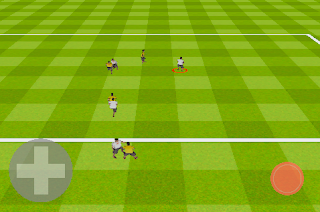
Wednesday 12/2: New grass texture made from scratch with Inkscape and Gimp! I'm really proud of it. Also, started an overhaul of the throwing controls.

Subscribe to:
Posts (Atom)
